My Other blog
Vote

Free Brushes

Showing posts with label Coffee. Show all posts
Showing posts with label Coffee. Show all posts
Wednesday, 29 January 2025
Simply right click and save as.


Thank you so much Kitt
Thursday, 17 October 2024


Monday, 28 August 2023
This cluster is made using the wonderful kit by MizTeeques Digital Designs http://mizteeques.blogspot.com
If you download the kit remember to say thank you ♥


Friday, 25 August 2023
This cluster is made using the wonderful kit by Scottish Butterfly http://scottishbutterfly.blogspot.com
You can download the kit HERE


Saturday, 3 September 2022
Who doesn't love a lovely cup of coffee in the autumn mornings.

You can download the cluster
Made using the beautiful kit by our very own Persia. You can download the kit in our group www.sensualposers.net
Thank you Gail

Thank you Alex

Thank you Vicki

Thank you Tamie


Wednesday, 4 May 2022

:- Supplies Needed -:
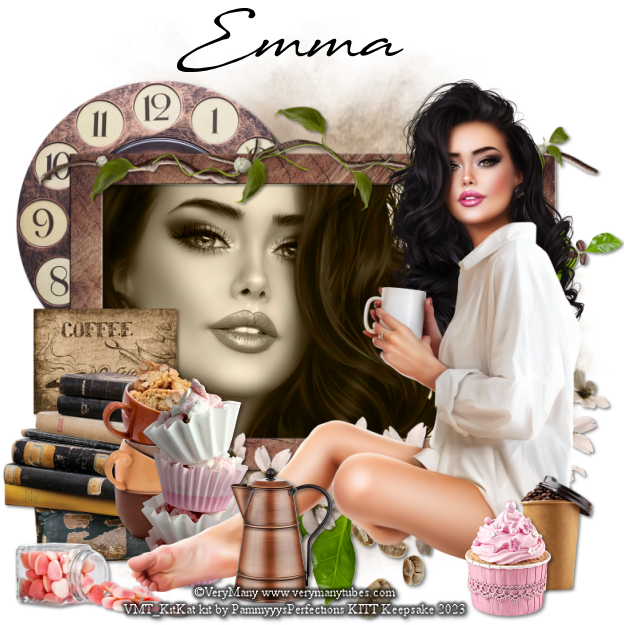
Tube of choice - I am using Nora by VeryMany
You can purchase it https://verymanytubes.com/
Scrapkit called Cupcakes & Coffee by PammyyysPerfections https://pammyyysperfections.blogspot.com/2022/04/new-ftu-kit-cupcakes-coffee.html
Font of choice. I used Antro Vectra
♥
Info
C/P + Copy and paste
Resize (click image - resize)
Add d/s = Add drop shadow
≈☆≈
Lets Get Started
Open a new transparent image 800 x 800 pixels
C/P CNC~Paper7 as a new layer
Layers - mask layer - from image and select your mask
Layers - merge - merge group
≈☆≈
Open CNC~Frame1
C/P into your image as a new layer
Resize 70%
Using your selection tool, draw round the outside of the frame
Open CNC~Paper3
C/P as a new layer
Drag below the frame
Selections - Invert
Hit delete on your keyboard
Selections - select none.
≈☆≈
Select the frame layer and add a d/s
Open CNC~Element50 (flower cluster)
C/P as a new layer
Resize 70%
Position towards the bottom right of your frame
Add a d/s
≈☆≈
Open CNC~Element49 (Vine)
C/P as a new layer
Resize 70%
Position at the top of your frame
Add a d/s
≈☆≈
Open CNC~Element36 (sign)
C/P as a new layer
Resize 20%
Position towards the middle left of your frame
See tag for reference
Add a d/s
≈☆≈
Open CNC~Element46 (leaves)
C/P as a new layer
Resize 30%
Position towards the middle right of your frame
See tag for reference
Add a d/s
≈☆≈
Open CNC~Element18 (stack of books)
C/P as a new layer
Resize 30%
Position towards the lower left of your frame
See tag for reference
Add a d/s
≈☆≈
Open CNC~Element8 (stack of cups)
C/P as a new layer
Resize 25%
Position towards the lower left of your books
See tag for reference
Add a d/s
≈☆≈
Add your tube
Resize if needed
Add a d/s
≈☆≈
Open CNC~Element16 (Jar of sweeties/candy)
C/P as a new layer
Resize 25%
Position towards the lower left on your tube
See tag for reference
Add a d/s
≈☆≈
Open CNC~Element4 (Coffee cup)
C/P as a new layer
Resize 15%
Position towards the lower right of your tube
See tag for reference
Add a d/s
≈☆≈
Position your elements how you like
Add any other elements you wish
Resize your tag if needed
Add copyrights
Save as PNG
≈☆≈
Tutorial written by Emma on May 4th 2022
Thank you Vicki ♥

Thank you Tamie ♥

Thank you Magik ♥

Thank you Melanie ♥

Thank you Pammers ♥

Thank you Kitt
Thank you Beth

Tuesday, 3 May 2022

Supplies needed
Tube of choice - I am using Nora by VeryMany
You can purchase it https://verymanytubes.com/
Scrapkit called Cafe au lait By Miz https://mizteeques.blogspot.com/p/ftu-scrapkits.html
Mask Miz_Mask_346 by Miz http://mizteequesmasks.blogspot.com/2020/02/masks-341-350.html
Template by Millie https://milliespspmadness.blogspot.com/2019/06/new-freebie-temp-on-my-blog-and-tag.html
Font of choice - I used 2Peas DW Sydney
♥
Info
C/P + Copy and paste
Resize (click image - resize)
Add d/s = Add drop shadow
♥
Lets Get Started
Open template - Shift D to duplicate.
Close out original.
Delete the copyright layer
Select the very bottom layer
C/P Miz_CAL_paper 1 as a new layer
Layers - New Mask Layer - Select Miz Mask 346
Layers - Merge - Merge group
♥♥♥♥
Open Miz_CAL_element 34
C/P as a new layer
Drag towards the upper right
♥♥♥♥
Merge layers 1 & 2 of the template
Selections - Select All
Selections - Float
Selections - Defloat
Open Miz_CAL_paper 4
C/P as a new layer
Selections - Invert
Hit delete on your keyboard
Layers - Merge down
Add a d/s
♥♥♥♥
Merge layers 3 & 4 of the template
Selections - Select All
Selections - Float
Selections - Defloat
Open Miz_CAL_paper 10
C/P as a new layer
Selections - Invert
Hit delete on your keyboard
Layers - Merge down
Add a d/s
♥♥♥♥
Select layer 5 of the template
Selections - Select All
Selections - Float
Selections - Defloat
Open Miz_CAL_paper 1
C/P as a new layer
Selections - Invert
Hit delete on your keyboard
Layers - Merge down
Add a d/s
♥♥♥♥
Merge layers 6 & 7 of the template
Selections - Select All
Selections - Float
Selections - Defloat
Open Miz_CAL_paper 11
C/P as a new layer
Selections - Invert
Hit delete on your keyboard
Layers - Merge down
Add a d/s
♥♥♥♥
Select layer 8 of the template
Selections - Select All
Selections - Float
Selections - Defloat
Open Miz_CAL_paper 2
C/P as a new layer
Selections - Invert
Hit delete on your keyboard
Layers - Merge down
Add a d/s
♥♥♥♥
Select layer 9 of the template
Selections - Select All
Selections - Float
Selections - Defloat
Open Miz_CAL_paper 4
C/P as a new layer
Selections - Invert
Hit delete on your keyboard
Layers - Merge down
Add a d/s
♥♥♥♥
Open Miz_Cal_element 36
C/P as a new layer
Resize - 70%
Position Slightly left (see tag for reference)
Add a d/s
♥♥♥♥
Open Miz_CAL_element 51
C/P as a new layer
Resize - 70%
Position onto the tag
♥♥♥♥
Open Miz_CAL_element 27
C/P as a new layer
Resize - 40%
Position lower center (See tag for reference)
Add a d/s
♥♥♥♥
Open Miz_CAL_element 11
C/P as a new layer
Resize 40%
Position towards the left of your tag
Add a d/s
♥♥♥♥
Open Miz_CAL_element 25
C/P as a new layer
Resize 30%
Position towards the left of your tag
Add a d/s
♥♥♥♥
Open Miz_CAL_element 38
C/P as a new layer
Resize - 30%
Position just to the right of the coffee pot
Add a d/s
♥♥♥♥
Open Miz_CAL_element 22
C/P as a new layer
Resize - 30%
Position just to the left of the coffee pot
Add a d/s
♥♥♥♥
Open Miz_CAL_element 23
C/P as a new layer
Resize - 20%
Position just in front of the sugar bowl
Add a d/s
♥♥♥♥
Open Miz_CAL_element 29
C/P as a new layer
Resize - 20%
Position just in front and left of the sugar cubes
Add a d/s
♥♥♥♥
Add your tube and position how you like
Add a d/s
♥♥♥♥
Open Miz_CAL_element 40
C/P as a new layer
Resize - 20%
Position just in front of your tube
Add a d/s
♥♥♥♥
Reposition any of the elements you placed to your liking and add any others you wish.
Resize tag if needed
Add copyrights and your name
Save as PNG
♥♥♥♥
Thank you Kitt

Tutorial written by Emma on May 3rd 2022
Thursday, 9 July 2020
Hope you enjoy these.
Please right click and save as
Personal Use ONLY and please direct people to this blog to download.


Saturday, 1 June 2019
Clusters made by our forum members
Emma


Jilly

Tracy



Emma


Jilly

Tracy

Donnalee

Marty
Kitt


Jill


Subscribe to:
Posts
(Atom)